
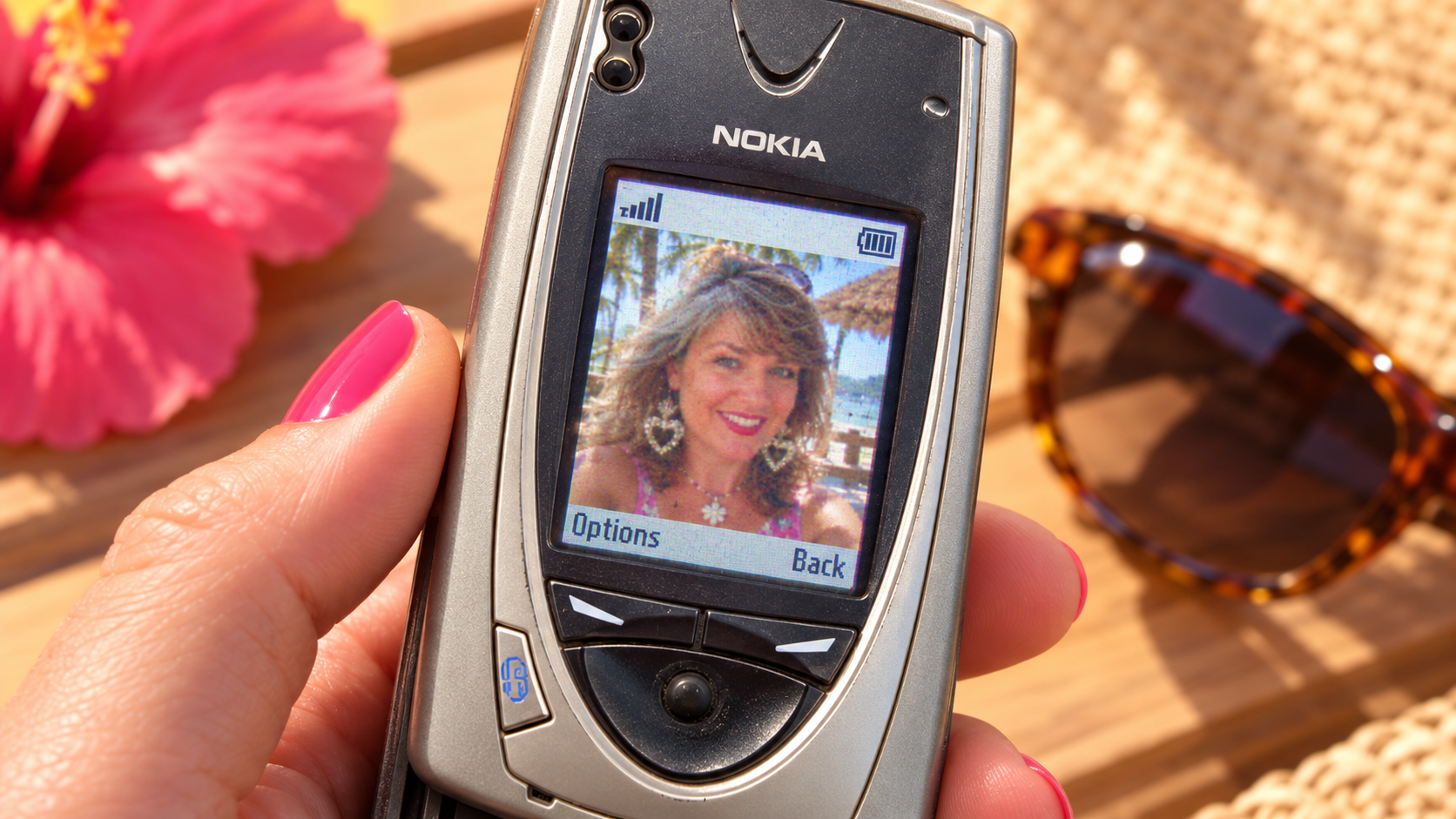
Before smartphones made every photo sharp, bright, and computationally polished, camera phones captured memories with tiny sensors, limited resolution, strange color, and almost no help from software.
This prompt recreates that specific early-mobile-camera look. Upload a modern reference photo and let the prompt keep the person recognizable while changing the hairstyle, outfit, styling, and setting to feel like the image could genuinely have been taken on a camera phone in the early 2000s.
2000s Camera Phone Snapshot Prompt
Use my uploaded photo as the identity reference and transform it into an authentic early-2000s camera-phone snapshot. Preserve the same person’s recognizable facial identity, facial proportions, age range, skin tone, eye color, and defining features. Do not turn them into a different person. Restyle the subject so the image feels genuinely photographed between approximately 2003 and 2007. Era styling: change the hairstyle, hair styling, outfit, accessories, and makeup to believable early-2000s choices that suit the subject naturally. Use details such as layered or highlighted hair, side-swept bangs, hoop or statement earrings, camisoles, layered tops, denim, fitted tees, track jackets, sunglasses, chunky belts, simple necklaces, or other period-appropriate casual fashion where appropriate. Scene: [BEACH VACATION / MALL / BEDROOM MIRROR / HOUSE PARTY / SCHOOL HALLWAY / FOOD COURT / ARCADE / OTHER 2000s SETTING]. Pose and moment: make the photograph feel casual and spontaneous rather than like a modern editorial shoot. Use slightly awkward real-life framing, a relaxed smile, casual posture, or an imperfect selfie-like angle. Camera quality: emulate an early color Nokia-era camera phone with a tiny sensor and approximately VGA-to-sub-megapixel visual quality. The image should look noticeably lower resolution than a modern smartphone photograph. Reduce fine detail significantly. Background objects, foliage, distant faces, architecture, and fabric texture should appear simplified, soft, or slightly muddy instead of crisp. Color: muted and slightly inaccurate early-digital color, reduced saturation, limited dynamic range, subtle green, cyan, magenta, or warm white-balance drift, and no modern HDR look. Image artifacts: modest JPEG compression, light blockiness in fine detail, faint digital noise, small-sensor softness, mild sharpening halos, slightly clipped highlights, muddy shadows, occasional motion softness, and imperfect exposure. Do not apply film grain, analog film borders, disposable-camera light leaks, VHS scan lines, cinematic color grading, modern portrait-mode blur, or ultra-sharp digital detail. This should look digital and cheap, not analog. Aspect and framing: use a compact early-camera-phone photo shape such as 4:3 or a small portrait-oriented crop appropriate to a 2000s phone gallery image, depending on the scene. If the output includes the physical phone, show an authentic early-2000s camera phone with a built-in camera lens, physical keypad or navigation controls, and a small color LCD. On the screen, display the transformed low-resolution photo. For visible phone UI, include simple period-appropriate English interface elements: signal bars, battery icon, image-viewer frame, and soft-key labels such as “Options” and “Back.” Optional screens may use “Gallery” and “Select.” Keep the UI blocky, small, and consistent with early mobile displays. Do not use modern smartphone icons, touch controls, status bars, app interfaces, or high-resolution typography. The final result should feel like a real personal photo rediscovered from an old camera-phone gallery: imperfect, compressed, low-detail, emotionally believable, and unmistakably early 2000s.
What This Prompt Creates
This prompt creates a deliberately low-quality digital snapshot inspired by early color camera phones from roughly the 2003–2007 era.
The person from your reference image remains recognizable, but the styling shifts backward in time: layered or highlighted hair, period-appropriate casual fashion, accessories, makeup, and environments that fit the era. The camera treatment adds small-sensor softness, weak dynamic range, compression artifacts, digital noise, muted or slightly inaccurate color, awkward framing, and backgrounds with very little fine detail.
The result works especially well for Y2K nostalgia posts, fake old family photos, vacation memories, mall snapshots, bedroom selfies, house-party images, school-hallway scenes, and social posts built around “what if this photo was taken in 2004?”
How to Use It
Upload a clear reference photo of the person you want to transform. Ask the model to preserve their identity, facial structure, age range, skin tone, and recognizable features while allowing the hairstyle, outfit, accessories, makeup, and environment to change.
Choose a scene that feels natural for the era, such as a beach vacation, shopping mall, bedroom mirror, house party, school hallway, food court, arcade, amusement park, or family gathering.
Then specify how strongly you want the early-phone look. The most convincing results come from reducing detail rather than simply adding noise: softer edges, muddy backgrounds, weak highlight recovery, limited color depth, slight white-balance errors, blocky JPEG compression, and modest motion blur.
If you want the phone itself visible, ask for an early-2000s camera-phone mockup with a small color display and period-correct UI. Keep interface text simple and readable, using English soft-key labels such as “Options,” “Back,” “Select,” or “Gallery,” plus signal and battery icons.
Make It Your Own
Beach Vacation: Restyle the subject with early-2000s resort fashion, sunglasses, layered hair, and a tropical background rendered with very limited detail and washed digital color.
Mall Hangout: Place the subject in a bright indoor mall or food court with shopping bags, glossy tile, fluorescent lighting, and the slightly blown highlights typical of a tiny phone sensor.
Bedroom Mirror: Create a casual mirror-style snapshot in a poster-covered bedroom with era-appropriate clothes, accessories, desktop-computer details, and intentionally poor low-light quality.
House Party: Use direct or weak built-in flash, dark backgrounds, red plastic cups, crowded framing, motion softness, and noisy shadows to create an authentic party-camera-phone feel.
School Hallway: Restyle the subject with a backpack, books, layered tops, denim, or other early-2000s school fashion and keep the hallway fluorescent, soft, and low-detail.
Tips for Better Results
Preserve identity, not styling. Tell the model to keep the person recognizable while explicitly allowing hair, makeup, clothing, accessories, and environment to change to match the early 2000s.
Ask for lower information density. A convincing old camera-phone photo should not contain today’s crisp pores, individual palm leaves, distant signage, or perfectly resolved fabric texture.
Mute the color. Early camera-phone photos often had limited dynamic range and imperfect white balance, so slightly dull, warm, greenish, or cool casts can feel more believable than modern vibrant grading.
Use modest resolution cues. Ask for the look of roughly VGA or sub-megapixel mobile photography, visible JPEG compression, light digital noise, slight softness, and simplified backgrounds. Avoid turning the image into giant pixel art.
Keep the interface simple when showing a phone screen. Signal bars, battery, a small image-viewer area, and two English soft-key labels are enough. Too many modern icons or touchscreen controls will immediately break the illusion.