
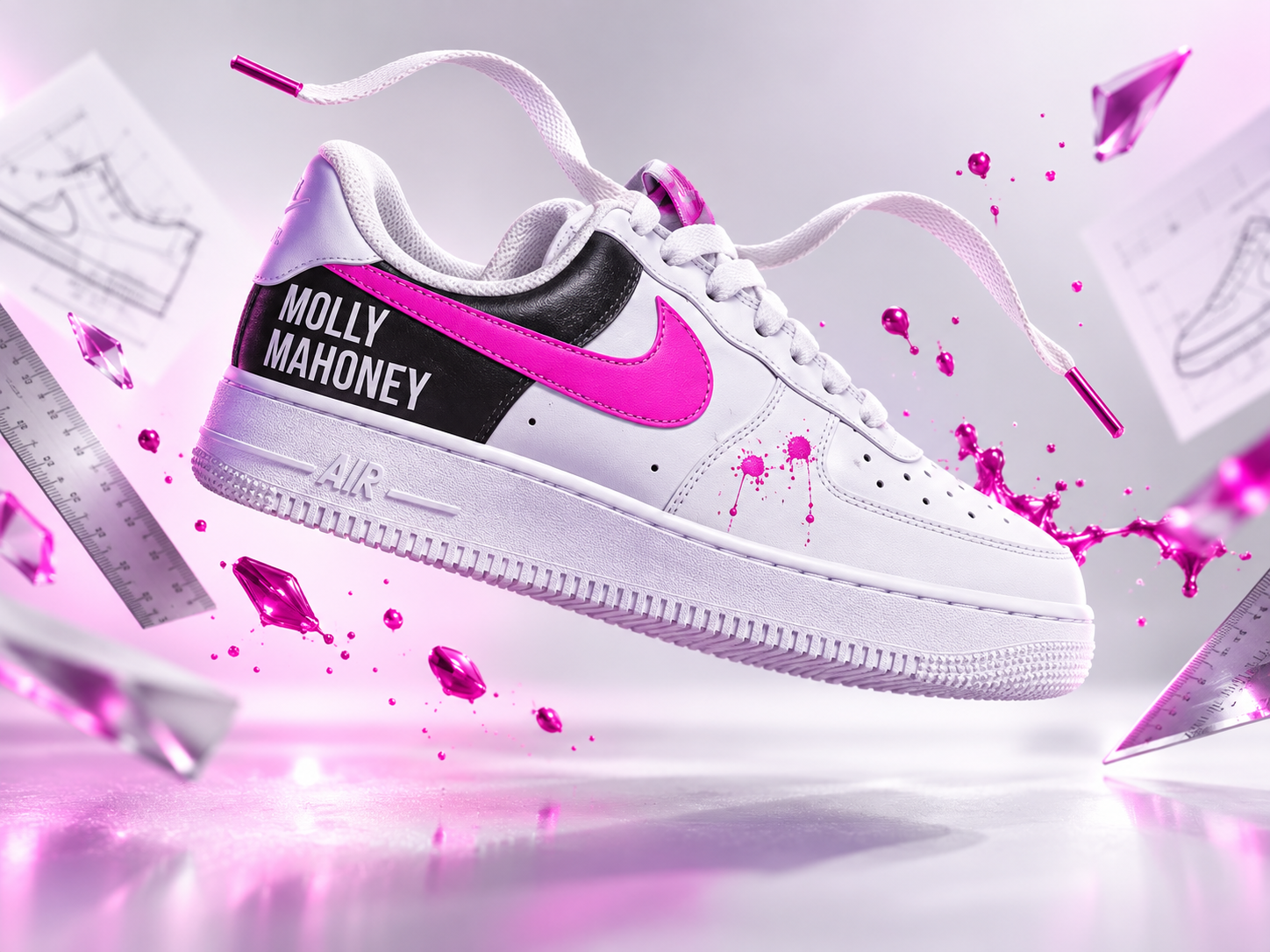
You do not always need a perfect studio photo to create a strong product ad.
Sometimes all you have is a quick photo taken by hand, a busy background, an awkward angle, or part of the product hidden behind fingers or other objects.
This prompt is designed for exactly that situation.
Upload the product image you already have, and the AI uses it as a visual reference to isolate the product, clean up the presentation, improve the angle, and rebuild it as a polished floating product photograph.
The goal is not to redesign the product. It is to make the product you already have look like it belongs in a professional campaign.
Floating Product Photography Prompt
Use the uploaded image as the exact visual reference for the product. Transform the casual source photo into a premium floating commercial product photograph. PRODUCT EXTRACTION: Carefully isolate the product from the uploaded image. Completely remove: – The original background – Hands and fingers – People – Tables or surfaces – Unnecessary props – Distracting objects – Unwanted shadows from the original photo Preserve the product itself as accurately as possible. PRODUCT ACCURACY: Maintain the product’s recognizable: – Shape – Proportions – Colors – Materials – Textures – Logo – Printed text – Typography – Patterns – Stitching – Packaging details – Unique design features Do not redesign the product. Do not replace the branding with generic text. ANGLE AND PERSPECTIVE: Improve the product’s presentation where necessary. Correct awkward perspective, rotation, or camera angle so the product appears intentionally photographed for a commercial campaign. Choose a flattering three-quarter or hero angle that clearly shows the most important features of the product. Keep the new perspective believable and consistent with the original product construction. OCCLUDED AREAS: If a hand, finger, person, or another object hides a small portion of the product, reconstruct only the missing area needed to create a complete and believable product. Use visible product details as the reference. Do not invent unnecessary new features. FLOATING COMPOSITION: Position the product suspended naturally in mid-air as the main focal point. Create a dynamic but believable floating pose. The product should feel balanced rather than randomly rotated. Use intentional negative space around it so the image can work as an advertisement or campaign hero image. LIGHTING: Use high-end commercial studio lighting. Include: – Controlled highlights – Realistic shadows – Realistic reflections – Clear material definition – Sharp product details – Subtle rim lighting – Believable depth – Premium advertising polish The lighting should enhance the real materials of the product rather than make it look plastic or artificial. BACKGROUND: Replace the original environment with a clean advertising background. Choose a background color and lighting treatment that complements the colors, mood, and personality of the uploaded product. The background may be: – Clean studio – Soft gradient – Dark premium – Bright minimal – Bold branded color – Subtle environmental set Keep the product clearly separated from the background. SUPPORTING ELEMENTS: Add a small number of floating secondary elements that make sense for the product. Examples may include: – Laces – Fabric pieces – Ingredients – Water droplets – Ice – Fruit – Leaves – Packaging elements – Particles – Dust – Glass – Accessories – Subtle branded geometric shapes These elements should support the product, not compete with it. If the product does not need supporting elements, keep the composition minimal. SHADOW: Create a realistic soft shadow beneath or behind the floating product so it feels physically present within the scene. MOOD: Premium, polished, dynamic, modern, commercial, and highly shareable. The finished image should look like professional advertising photography created for a product launch, ecommerce campaign, billboard, website hero, or social media advertisement. IMPORTANT: – Do not redesign the product. – Do not change the logo. – Do not alter readable product text. – Do not change the core colors. – Do not distort the product proportions. – Do not add incorrect features. – Do not leave visible parts of the original hand, person, or background. – Do not make the product look melted, warped, or artificially generated. OPTIONAL CREATIVE DIRECTION: Background style: [CLEAN / DARK / COLORFUL / MINIMAL / ETC.] Brand mood: [BOLD / PREMIUM / PLAYFUL / LUXURY / SPORTY / ETC.] Accent colors: [OPTIONAL] Supporting elements: [OPTIONAL] Campaign format: [WEBSITE HERO / SOCIAL AD / POSTER / ECOMMERCE / ETC.]
What This Prompt Creates
This prompt takes a regular product photo and turns it into something much closer to a professionally art-directed campaign image.
The AI first treats the uploaded photo as a reference rather than as the final composition.
That means it can remove the original environment, clean up anything covering the product, improve the viewing angle, and rebuild the presentation around the product itself.
The result is a floating hero shot with stronger lighting, cleaner composition, and enough polish to work for advertising, ecommerce, social media, or campaign mockups.
How to Use This Prompt
Start by uploading the clearest product photo you have.
It does not have to be photographed against a white background.
A photo taken while someone is holding the product can still work, as long as enough of the product is visible for the AI to understand its design.
Then paste the prompt and fill in the optional creative direction.
For our sneaker example:
Background style:
Bright minimal studio
Brand mood:
Bold, creative, energetic
Accent colors:
White, black, and hot pink
Supporting elements:
Floating laces, rulers, design sketches, magenta particles
Campaign format:
Website hero and social advertising
That gives the AI more direction without forcing you to describe the entire product from scratch.
Make It Your Own
The same workflow can work across many types of products.
Sneakers
Remove the hand holding the shoe, correct the viewing angle, and create a floating sneaker hero shot with laces, fabric elements, dust, or branded details suspended around it.
Skincare
Turn a simple bottle photo into a clean beauty campaign with water droplets, botanicals, mist, and glossy studio lighting.
Food and Beverage
Transform a casual can or bottle photo into a high-energy commercial scene with ice, condensation, fruit, splashes, or ingredients.
Tech Products
Isolate headphones, cameras, phones, keyboards, or other devices and create a sleek floating composition with subtle lighting and supporting components.
Packaging
Turn a quick photo of a box, bag, bottle, or pouch into polished ecommerce or campaign photography while preserving the packaging artwork.
Tips for Better Results
The source photo still matters.
The AI can correct a lot, but it performs best when the product is reasonably visible.
Try to avoid images where half of the product is completely hidden or where important logos and text cannot be seen at all.
If branding accuracy matters, reinforce this instruction:
Preserve the product’s exact branding, logo, typography, colors, and design details.
For products with complicated materials, describe what they are.
For example:
white leather sneaker with black leather panel, pink stitched swoosh, white rubber sole
That helps prevent the AI from interpreting materials incorrectly.
Also give the AI permission to improve the angle without changing the product itself.
There is an important difference between:
“Redesign this sneaker.”
and:
“Present this exact sneaker from a cleaner commercial hero angle.”
The second instruction preserves the product while improving how it is shown.
Why Floating Product Photography Works
Floating compositions immediately separate the product from everyday reality.
Once the table, hand, room, and background disappear, the viewer’s attention goes directly to the object.
The extra negative space also gives designers room to add headlines, prices, calls to action, or campaign messaging later.
And because the composition can be adapted to almost any product category, this style is useful far beyond one specific brand or industry.
Final Thought
You do not always need another photoshoot.
Sometimes the useful starting point is simply the photo you already have.
Remove the distractions, preserve what makes the product recognizable, improve its presentation, and build the campaign around it.