
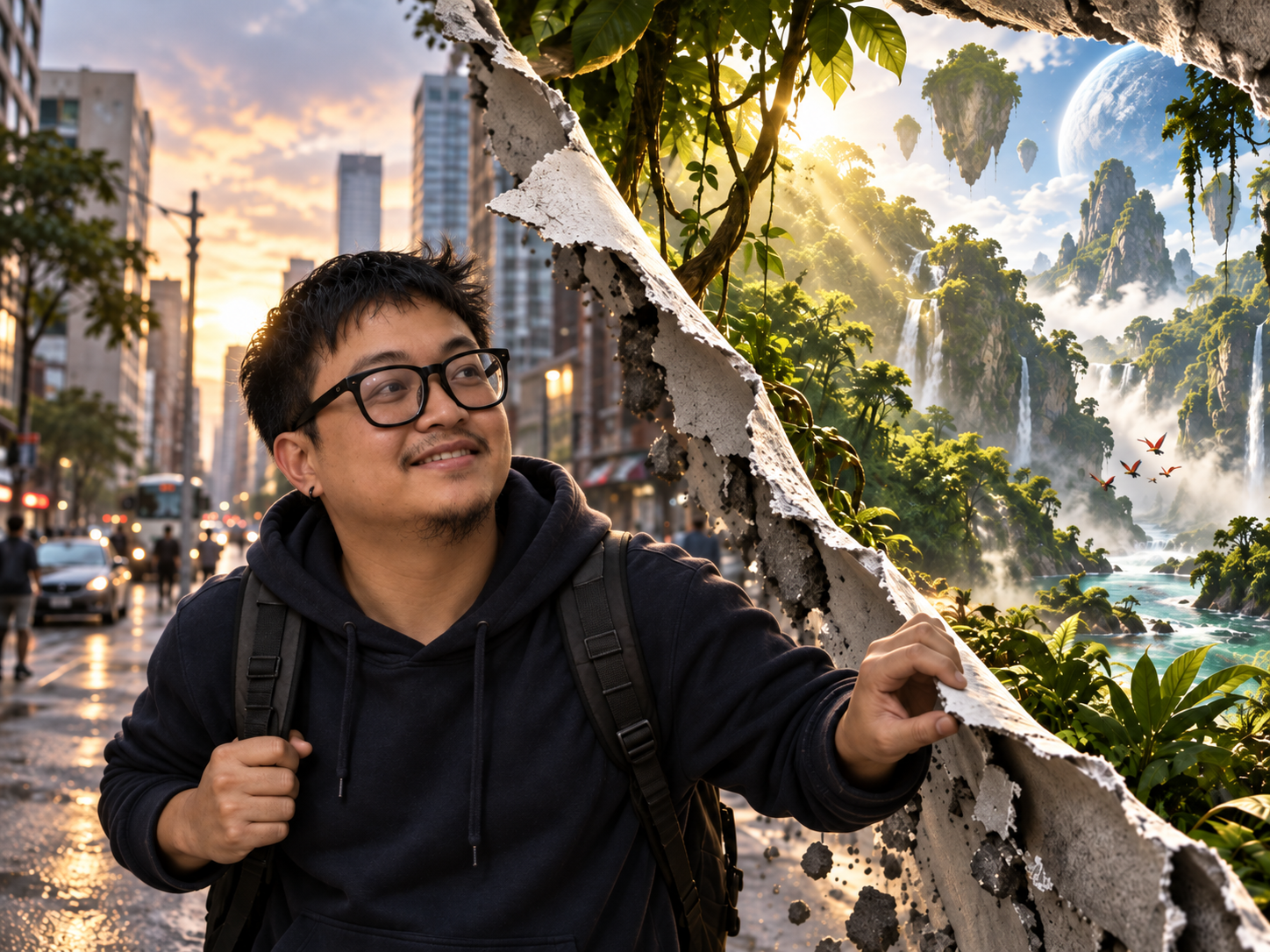
What if your photo was only the surface of something much bigger?
This prompt turns an ordinary image into a cinematic reality-breaking scene by creating a physical tear through the environment and revealing an entirely different world underneath. Instead of blending two images together, the effect is built with dimensional ripped edges, shadows, debris, lighting, and perspective so the alternate reality feels like it genuinely exists behind the original scene.
Reality Rip Reveal Prompt
Use the uploaded image as the exact visual reference for the original scene. Transform the image into a cinematic alternate-reality reveal where a section of the visible world has been physically torn open, exposing a completely different environment behind it. The final result should look like reality itself has a physical surface that has been ripped apart. Do NOT create a simple split-screen, transparent overlay, double exposure, or blended transition. ORIGINAL IMAGE: Preserve the recognizable structure of the uploaded photograph. Keep important elements such as: – People – Faces – Clothing – Buildings – Vehicles – Objects – Street layout – Architecture – Lighting direction – Camera perspective If a recognizable person appears in the uploaded photo, preserve their facial features, skin tone, hairstyle, glasses, body proportions, and overall identity. Do not significantly change their face. THE REALITY TEAR: Create one dramatic physical tear through the scene. Tear direction: [VERTICAL / DIAGONAL / HORIZONTAL / CIRCULAR / IRREGULAR] The opening should feel naturally ripped rather than perfectly geometric. Create believable dimensional edges with: – Torn surface layers – Irregular broken edges – Curled sections – Cracked material – Fragments – Dust – Small debris – Surface thickness – Directional shadows – Occlusion – Realistic depth The tear should have visible thickness. It must feel like the original reality is a physical layer being pulled apart. HIDDEN WORLD: Behind the tear, reveal: [HIDDEN WORLD] Examples: – Lush fantasy jungle – Alien planet – Deep ocean – Futuristic city – Outer space – Ancient civilization – Dreamlike cloud world – Volcanic landscape – Magical forest – Frozen world The hidden environment should continue naturally into deep space behind the opening. Do not place it flat against the tear like a printed poster. Create convincing environmental depth using foreground, middle ground, and background elements. INTERACTION: If a person is visible near the tear, allow them to interact naturally with it. Possible interactions: – Pulling the torn edge open – Looking through the opening – Reaching toward the hidden world – Standing beside the tear – Walking through it – Reacting with curiosity or amazement Preserve natural human anatomy. Hands and fingers must interact believably with the torn surface. Do not distort the person’s face or body. LIGHTING INTERACTION: The hidden world should emit light appropriate to its environment. Allow some of that light to spill naturally into the original scene. The original scene and hidden world must still remain visually distinct. REALISTIC DEPTH: Create clear dimensional layers: 1. Camera 2. Original environment 3. Front surface of reality 4. Torn and curled edges 5. Opening 6. Hidden environment 7. Distant background of the alternate world Use realistic shadows and occlusion between these layers. The hidden world must appear physically behind the original environment. COMPOSITION: Keep the uploaded scene recognizable while making the reality tear the main visual event. Use a strong cinematic composition. The tear may occupy approximately: [AMOUNT REVEALED] Options: – SUBTLE: 15–25% of the image – MEDIUM: 30–45% – DRAMATIC: 45–60% Avoid covering the entire original image. CAMERA: Maintain the original camera perspective. Use realistic photographic depth of field. Keep environmental scale believable. Use cinematic detail, natural lens behavior, and realistic exposure. MOOD: [MOOD] STYLE: Photorealistic. Cinematic. Immersive. High-detail. Physically believable. Surreal concept executed with realistic photography. IMPORTANT: – Preserve recognizable people in the source image. – Do not significantly alter faces. – Do not create a simple before-and-after split. – Do not blend the environments with a soft gradient. – Do not create a transparent portal. – Do not make the opening perfectly rectangular. – Do not make the hidden world look printed onto a wall. – The tear must have physical thickness. – Use realistic shadows around the ripped edges. – Make debris and fragments follow gravity. – Keep perspective consistent. – Maintain believable lighting interaction. – Avoid excessive destruction of the original scene. – Keep the result photographic rather than illustrated unless requested otherwise. OPTIONAL CREATIVE DIRECTION: Hidden world: [JUNGLE / SPACE / OCEAN / FUTURE CITY / FANTASY / ETC.] Tear direction: [VERTICAL / DIAGONAL / HORIZONTAL / CIRCULAR / IRREGULAR] Amount revealed: [SUBTLE / MEDIUM / DRAMATIC] Mood: [CINEMATIC / DREAMLIKE / DARK / ADVENTUROUS / MAGICAL] Interaction: [NONE / PULLING OPEN / LOOKING THROUGH / WALKING THROUGH] Time of day: [KEEP ORIGINAL / SUNSET / NIGHT / GOLDEN HOUR / ETC.] Color direction: [NATURAL / WARM / COOL / VIBRANT / MUTED] Aspect ratio: [4:3 / 4:5 / 16:9 / 1:1]
What This Prompt Creates
This prompt creates a photorealistic alternate-reality effect while keeping the original photograph recognizable.
Instead of treating the hidden world as an overlay, it builds the effect around physical depth. The original environment becomes the front layer, the torn edges establish thickness, and the alternate world exists behind the opening.
The result can feel like a frame from a fantasy film, game campaign, movie poster, album cover, social ad, or experimental personal project.
How to Use It
Upload almost any photograph with a clear environment.
Street scenes work especially well because buildings, roads, people, and objects give the AI plenty of scale references. Landscapes, interiors, portraits, and travel photos can also work.
Then choose what should exist behind reality.
For the featured example:
Hidden world: Lush fantasy jungle with waterfalls, floating mountains, mist, and distant flying creatures
Tear direction: Diagonal
Amount revealed: Dramatic
Mood: Adventurous and cinematic
Interaction: Pulling the opening apart
Time of day: Golden hour
Color direction: Natural city tones contrasted with vivid tropical greens
Aspect ratio: 4:3
The most important variable is the hidden world. Give it enough visual direction to feel distinct from the original photograph.
Make It Your Own
City to Outer Space
Rip through an ordinary downtown street and reveal a massive planet, stars, nebulae, and spacecraft behind the city.
Office to Tropical Paradise
Turn a normal office wall into a torn opening overlooking turquoise water, palm trees, cliffs, and bright tropical sunlight.
Bedroom to Underwater World
Reveal an enormous underwater environment behind the room, complete with schools of fish, coral, shafts of sunlight, and distant whales.
Modern City to Ancient Civilization
Tear open a contemporary street to expose temples, ancient architecture, vegetation, and people from another era.
Portrait to Fantasy World
Keep the person in the foreground while they physically pull open the scene beside them, revealing a magical landscape behind reality.
Tips for Better Results
Choose an image with clear perspective. Streets, hallways, rooms, and landscapes naturally help the model understand where the hidden world should exist in three-dimensional space.
If the effect looks like two photographs pasted beside each other, add:
“Increase the physical depth of the tear. Add curled material, broken layers, thickness, directional shadows, fragments, and realistic occlusion around the opening.”
If the alternate world starts leaking into the original image, reinforce:
“Keep the two environments visually separate. The hidden world should only be visible through the physical opening.”
For portraits, remind the model to preserve identity. Large surreal edits can sometimes cause the AI to regenerate the person along with the environment.
If hands are interacting with the tear, inspect them carefully. You can simplify the interaction by changing it to “standing beside the opening and looking through it” if the model struggles with fingers gripping the edge.
The strongest results usually come from contrasting environments. A normal gray city revealing a vibrant jungle is more immediately readable than a city revealing another similar city.
Why This Works
The visual idea is simple enough to understand almost instantly:
Normal world outside. Impossible world inside.
That contrast creates curiosity before someone even understands how the image was created.
It also makes the prompt extremely reusable. The source photograph, hidden world, tear shape, lighting, and interaction can all change while the underlying concept remains recognizable.
Final Thought
You do not always have to replace the world in a photograph.
Sometimes it is more interesting to leave most of reality exactly where it is and reveal just enough of something impossible underneath it.
Rip it open and see what is on the other side.