
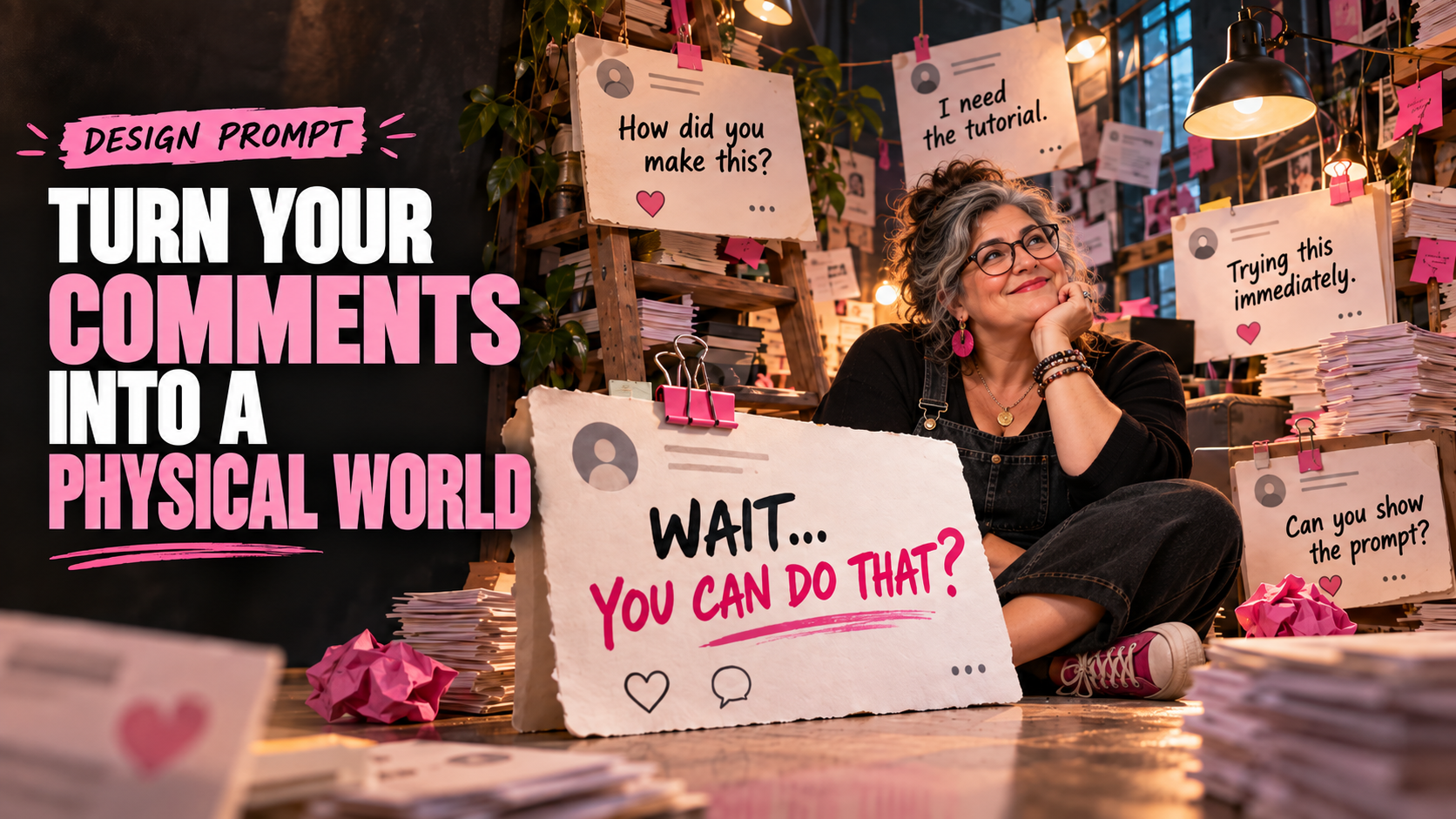
Most social content treats comments as something that happens after the post is published. This prompt flips that relationship and makes the audience part of the actual art direction.
Instead of pasting screenshots around a portrait, it asks AI to imagine comments as real objects with weight, depth, shadows, paper texture, and physical interaction. The result can turn an otherwise ordinary creator photo into a surreal campaign visual built around community conversation.
Turn Your Comments Into a Physical World Prompt
Using the uploaded image as the primary subject reference, create a surreal editorial scene where an online comment section has transformed into a real physical environment. Preserve the subject’s recognizable identity, facial structure, hairstyle, skin tone, clothing details, and overall appearance. Surround the subject with dozens of oversized physical comment cards inspired by the visual language of online conversations, but do not copy the interface, logo, icons, colors, or exact design of any specific social media platform. The comments should exist as tangible objects within the scene rather than flat digital overlays. Turn them into freestanding signs, hanging cards, stacked paper blocks, folded notes, posters attached to walls, cards leaning against furniture, and a few suspended overhead. Use realistic dimensional construction: thick paper edges, subtle bends, shadows, folds, printed ink texture, tape, clips, pins, and believable contact shadows where the cards interact with the environment. Feature several short, readable audience comments such as: “WAIT… YOU CAN DO THAT?” “How did you make this?” “I need the tutorial.” “Trying this immediately.” “Okay, this is genius.” “Can you show the prompt?” Make one comment significantly larger than the others and position it prominently in the foreground as the visual hook. Place the subject naturally inside the environment, interacting with the comments rather than simply standing in front of them. They might hold one card, step between stacks of comments, lean against an oversized reply, or look toward one floating above them. Composition should feel intentionally designed for social media: immediate visual hook, strong depth, clear focal point, layered foreground and background elements, and enough negative space to prevent the scene from becoming visually chaotic. Lighting: cinematic editorial photography with realistic shadows, soft directional key light, subtle rim lighting, and dimensional separation between the subject and physical comment cards. Camera: slightly wide environmental portrait, eye-level or subtly low angle, approximately 28–35mm lens perspective. Style: sophisticated surreal advertising photography, photorealistic materials, playful conceptual art direction, premium social campaign aesthetic, believable physical construction, high detail. Avoid recognizable social-media logos, trademarked interface elements, usernames belonging to real people, notification icons, engagement counts, or direct reproductions of an existing platform UI. The final result should look as though an art director physically constructed an entire room from the creator’s comment section and photographed the creator standing inside it.
What This Prompt Creates
The prompt creates a photorealistic environment constructed from audience comments. Replies can become oversized cards, walls, signs, paper sculptures, hanging installations, or objects the subject physically interacts with.
It works especially well for creator announcements, testimonials, FAQs, product launches, viral-post follow-ups, community milestones, educational content, and posts responding to frequently asked questions.
Because the interface styling remains generic, the concept can also work across multiple platforms instead of making the image look permanently tied to one social network.
How to Use It
Upload a clear photo of the creator, spokesperson, or product you want at the center of the scene. Replace the sample comments in the prompt with short comments from your own audience.
Keep most comments brief. Five to eight words usually work better visually than paragraphs because the AI has less typography to reproduce and viewers can understand the concept immediately.
Choose one comment as the hero comment. This should be the question, reaction, objection, or compliment that becomes the hook for the entire post.
Make It Your Own
FAQ Room
Fill the environment with the questions your audience asks most often. Make the creator physically point toward or answer the largest question.
Testimonial Wall
Replace casual comments with short customer reactions and arrange them like an immersive exhibition surrounding the product.
Viral Post Aftermath
Make hundreds of comments appear to have physically flooded the creator’s room after a post unexpectedly takes off.
Product Conversation
Put the product at the center while comments about features, questions, and reactions physically orbit or stack around it.
Negative-to-Positive Transformation
Place skeptical comments on one side of the scene and enthusiastic customer reactions on the other, creating a visual before-and-after narrative.
Tips for Better Results
Use real comments but shorten them when necessary. The visual should capture what people are saying without forcing the image model to typeset entire paragraphs.
Give the hero comment dramatically more scale than everything else. Without hierarchy, dozens of comment cards can quickly become a very expensive-looking pile of sticky notes.
Ask for comments to be physical objects, not interface overlays. Details such as paper thickness, folded corners, tape, shadows, clips, and cards leaning against furniture are what sell the illusion.
Keep usernames and profile photos out unless they’re essential to the concept. The audience’s words are usually enough, and generic cards make the finished visual cleaner and more reusable.
For carousel content, use the first slide for the impossible full-room visual, then progressively zoom into individual comments on later slides and answer them with the actual content.